
Email Encryption in Microsoft 365: A Practical Guide

Introduction
In this blog post, we aim to demystify the process of securing your emails using straightforward techniques available within the Microsoft 365 environment.
Join us as we explore practical steps to enhance your email privacy without the complexity.
Table of Contents
Prerequisites
The email encryption features of Microsoft 365 are grouped under the “Microsoft Purview Message Encryption”. It combines email encryption and rights management capabilities.
The Microsoft Purview Message Encryption is offered as part of Office 365 Enterprise E3 and E5, Microsoft 365 Enterprise E3 and E5, Microsoft 365 Business Premium, Office 365 A1, A3, and A5, and Office 365 Government G3 and G5. You don’t need additional licenses to receive the new protection capabilities powered by Azure Information Protection.
You can also add Azure Information Protection Plan 1 to the following plans to receive Microsoft Purview Message Encryption: Exchange Online Plan 1, Exchange Online Plan 2, Office 365 F3, Microsoft 365 Business Basic, Microsoft 365 Business Standard, or Office 365 Enterprise E1.
Also, you should note that Microsoft has rebranded email encryption recently, which may lead to confusion regarding its terminology, deployment, and use.
Activating Microsoft Purview Message Encryption
Microsoft Purview Message Encryption leverages the protection features in Azure Rights Management Services (Azure RMS), the technology used by Azure Information Protection to protect emails and documents through encryption and access controls.
The only prerequisite for using Microsoft Purview Message Encryption is that Azure Rights Management must be activated in your organization’s tenant.
Normally, Azure Rights Management is active by default, but depending on the timeline, it might not be. If it is not active, you may need to contact your system administrator. It is a non-trivial task that should be entrusted to only a seasoned system administrator.
Setting things up might be a bit difficult, but using it is the easy part!
But Aren’t All Emails Encrypted by Default?
Yes and no. Most email communications happen using STARTTLS. It prevents any third-party from snooping into the communication, but it does not prevnt mail servers themesleves from reading the contents of the email.
The STARTTLS provides transport layer security. As you can see in the diagram below, it encrypts email messages as they travel across the Internet between various servers and clients.
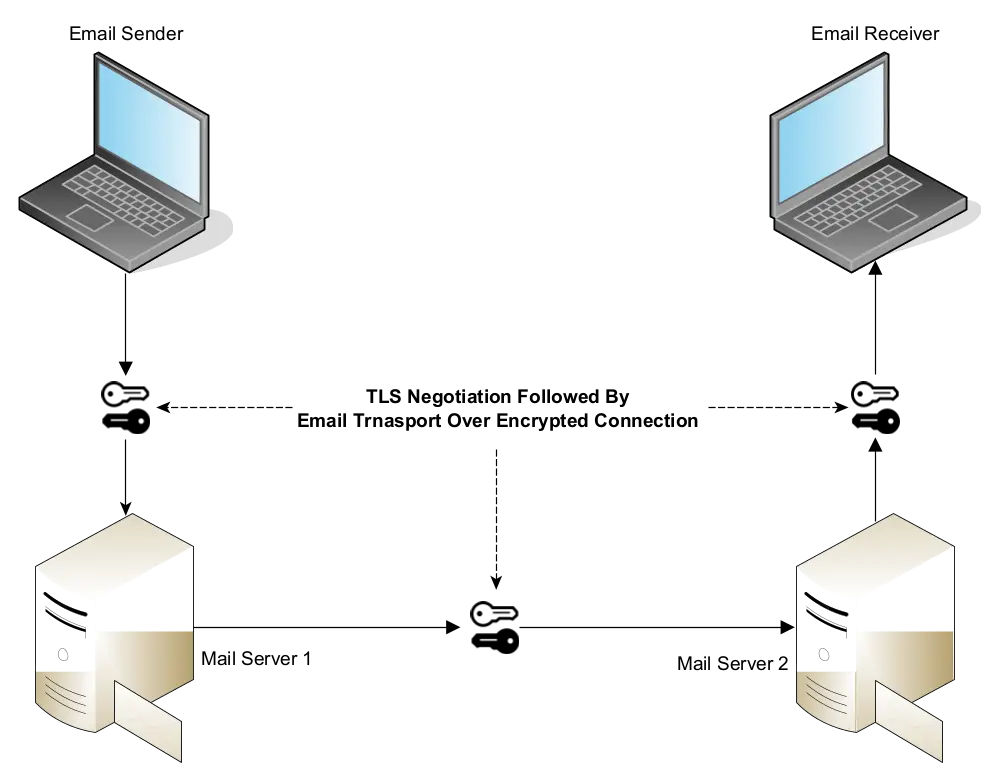
STARTTLS protects the communication from eavesdroppers, but it does not prevent mail servers from reading the contents of the email.
What Happens When You Encrypt Email in Office 365
When you encrypt an email with Microsoft Purview Message Encryption, you are effectively doing end-to-end encryption. It means that the data is encrypted and decrypted only at the end points.
As you can see in the diagram, the Office Message Encryption service will encrypt the email at the time of sending, and it will decrypt the email at the receiver’s end.

In simple words:
- Email is encrypted at source.
- Email will remain unreadable to mail servers during its transit.
- Email will be decrypted at the recipient’s endpoint.
Sending Encrypted Email from Outlook
If everything is set up properly, you can easily send encrypted email to anyone:
- Compose a new email as usual.
- Draft the message.
- From “Options”, select “Encrypt Only” from the list of available templates (see the screenshot for reference if required).
- Send.

What Happens at the Receiver’s End
For Microsoft 365 Users
If your recipient is also a Microsoft 365 user, the entire process works seamlessly.

As you can see in the screenshot, there is nothing to do. The receiver will be able to open and read your message as long as he/she is signed into the Microsoft 365 service.
For Users of Other Services (Non-Microsoft 365)
Recipients of encrypted messages who receive encrypted or rights-protected mail sent to their Gmail, Yahoo, or other accounts receive a wrapper mail that directs them to the Office Message Encryption (OME) Portal.
In the following example, we have sent an encrypted email to a Gmail user.

As you can see, the message has been received as an attachment in a wrapper email. When you click on the “Read the message” button, it will take you to the Office Message Encryption Portal, as you can see in the screenshot:
 The users of Gmail and Yahoo can sign in with their accounts to view the message. Alternatively, they can sign in with a one-time passcode. Also, this one-time passcode method is universally available to users of other email services as well.
In this instance, we are using a one-time passcode method:

Once you enter the OTP, you can see the encrypted message:

To summarize, if the user is not using Microsoft 365:
- If he uses Gmail (personal or business) or Yahoo, he can read the email by signing into the Office Message Encryption Portal with his Google or Yahoo account.
- Any recipient, including Gmail and Yahoo users, can also read the encrypted message by signing into the Office Message Encryption Portal with a one-time passcode.
Encrypted Email with Attachments
The Microsoft Purview Message Encryption automatically extends to the email attachments. However, it will encrypt only supported file formats. All unsupported file formats will remain unencrypted.
All modern Microsoft Office document formats such as DOCX, XLSX, PPTX, etc. are supported. Adobe PDF format is also supported.
Other attachment types including the older versions of MS Office files such as DOC and XLS are unsupported. These attachments will not be encrypted. Please refer to the official documentation for a comprehensive list of supported formats.
Once an email attachment is encrypted, only the intended recipient can open it. He can do so either by signing into the Microsoft 365 services or by signing into the Message Encryption portal.
Let us consider this scenario:
- Alex (alex@example.com) sends an encrypted email to Charlie (charlie@contoso.com) with a Word file attached to it.
- If Charlie is a Microsoft 365 user, he can seamlessly open the email, and he will also be able to open the Word file in a browser, or a desktop application.
- If Charlie uses any non-Microsoft email service, he can still view the email and the document using the OME portal.
- If Charlie forwards the attachment to Quinn via email or shares the attachment with Quinn using any other means (e.g., using a pen drive), Quinn still won’t be able to open it.
Additional Encryption Templates
Microsoft Purview Message Encryption comes with a few built-in templates that we can use out-of-box.
Do Not Forward: It prevents the recipients from forwarding or printing the email. It does so by disabling the “Forward” option in the mail client.
Confidential and Highly Confidential: These templates add further restrictions such as preventing external users from being able to view the contents of the email.
Automatic Message Encryption via Mail Flow Rules
You can configure Microsoft Exchange Mail Flow Rules in the EAC (Exchange Admin Console) to automatically encrypt emails based on the words in the subject, recipient address, sender address, and other sensitivity labels.
For example, we can set up a rule such that if someone mentions “Confidential” in the subject of the email, Microsoft Exchange will automatically encrypt it.
S/MIME vs. Microsoft Purview Message Encryption
S/MIME (Secure/Multipurpose Internet Mail Extensions) is an alternative method for email encryption. It is based on Public Key Infrastructure, i.e., it uses digital certificates to sign and encrypt emails.
Microsoft Purview Message Encryption is easy to set up. It works transparently across domains. But it only protects a limited number of attachment formats. If you want an email encryption system that protects all types of attachments, you must use S/MIME.
S/MIME requires more work to set up and use, but it can encrypt all types of attachments. However, it is more suitable for a small number of organizations that work closely with each other, e.g., government departments.
- February 21, 2025
Essential Cybersecurity Measures for 2025
If you are reading this, you probably already know that IT teams will face even greater cybersecurity challenges in 2025 than they did in 2024. Let us explore the four… - November 20, 2024
The Evolving Role of Managed Service Providers (MSPs) in SMB
MSPs like ForNext Technologies are not just IT support providers; they are growth partners. By addressing challenges and unlocking opportunities, we help SMBs focus on what they do best—running their… - August 23, 2024
How Small Companies Can Build an Effective Cybersecurity Training Program
By developing a robust employee cybersecurity training program, small businesses can significantly reduce risk and build a culture of vigilance. - July 10, 2024
SharePoint Online vs. OneDrive: Choosing the Right Tool for Your Team
In this blog post, we will delve into the differences between OneDrive for Business and SharePoint Online, highlighting why OneDrive is great for small teams and personal use, while SharePoint… - May 17, 2024
Supercharge Your Productivity with these Free Desktop Applications
Here is an extensive list of some of the best free productivity applications for PCs that will definitely help you boost your productivity and optimize your performance. - April 3, 2024
Email Authentication with SPF, DMARC, and DKIM
The importance of email authentication mechanisms - SPF, DMARC, and DKIM, for protection against email-based threats such as spoofing. - February 23, 2024
Why Should You Protect Your VPN with MFA
In this post, we explore the reasons why you should protect your VPN with MFA to ensure trusted access to your IT resources. - February 12, 2024
FREE: Migrate Your Emails and Data to Microsoft 365
A FREE Next-Generation Firewall (NGFW) solution to safeguard your network and increase productivity, including free 1-year technical support. - February 9, 2024
Zero Trust Architecture
In this post, we explore the "Zero Trust" Architecture. We will see why this "never trust, always verify" approach has become so important in the present IT landscape. We will… - January 31, 2024
The True Benefit of Outsourcing Your IT
When you hire an outside agency to manage the IT operations of your company, what would be the most important benefit you will get from it?
- Disclaimer
Company names, products, logos, trade marks and any other proprietary intellectual property or otherwise belongs to the rightful owner, which is not us. You should not assume, even if a company name is in the website/domain name of this website, that there is an express, implied, or otherwise agreement, joint venture, partnership, or other relationship between us as website proprietors and any of these companies that are discussed merely for educational or other purposes. The opinions, estimates, expectations, and projections contained in any disseminated information are accurate as of the date of release and are subject to change without additional notice. We do our best to ensure that the presented research and/or information has been compiled, obtained, discerned, or interpolated from reliable and trustworthy sources, and therefore believe the positions and beliefs shared are accurate and complete, though obviously not all material known or obtained will be contained, as distilling information into manageable quantity is in large part a goal. We are not responsible for any errors or omissions contained in any disseminated material and are not liable for any loss incurred as a result of using the material in any way. The intent is merely to provide useful information, products, and services, some of which we may be compensated for.
LET'S GET IN TOUCH...
