
Secure Your Aadhaar ID with Biometric Locking and Virtual Aadhaar ID

Introduction
AADHAAR, India’s unique identification system, has revolutionized the way individuals prove their identity. Almost all public and private organizations use Aadhaar for KYC or e-KYC.
However, it has also raised questions about the security of AADHAAR IDs and the protection of sensitive biometric data.
In this blog post, we will explore two fundamental security features of Aadhaar:
- Biometric Lock
- Virtual Aadhaar ID (VID)
- Aadhaar Lock
How Aadhaar is Used
As per the Aadhaar Act 2016, the Aadhaar card must be verified either in physical or in electronic form using authentication or offline verification. This verification can be done through fingerprint, iris scan, OTP authentication, QR code, etc.
Hence, it is nearly impossible to impersonate you if you use Aadhaar to prove your identity. Aadhaar identity, instead, is instantly verifiable and hence more trusted.
Just by knowing your Aadhaar number, no one can harm you. It is just like any other identity document, such as a passport, voter ID, PAN card, ration card, driving license, etc., that we have been using freely for decades.
If AADHAAR is so Secure, Why Bother?
The UIDAI (Unique Identification Authority of India) is responsible for the entire Aadhaar infrastructure. The system is well-designed and reasonably protected. However, we do not have much information about how good the protection is.
The Aadhaar data is stored in the database known as Aadhaar CIDR (Central Identities Data Repository). This data can only be accessed by an API (Application Programming Interface) service provided by the UIDAI. This API service is called QSAM (Query Service of Aadhaar Mapper).
The UIDAI also appoints AUA (Aadhaar User Agency) and KUA (KYC User Agency) that can verify Aadhaar IDs.
The AUA and KUA can access the Aadhaar CIDR via the QSAM to perform various tasks, including verification.
So theoretically, if there is a vulnerability in the QSAM or the underlying information systems, or if there is a compliance failure at any AUAs or KUAs, it can lead to unauthorized persons accessing the QSAM. It can have unwanted consequences.
Let’s get started with what steps we can take to protect our Aadhaar ID.
What is Aadhaar Biometric Locking?
The biometric locking and unlocking allows an Aadhaar holder to lock and temporarily unlock their biometrics. This facility aims to strengthen the privacy and confidentiality of card holder’s biometrics Data.
Locked biometrics confirms that the Aadhaar holder will not be able to use biometrics data (fingerprints/iris/face) for authentication. It is a safety feature to stop any biometric authentication.
It also ensures that any entity cannot perform biometric-based Aadhaar authentication for that Aadhaar holder.
The Aadhaar holder can perform this from the UIDAI website or the m-Aadhaar mobile app. In our experience, it is easier to use the website.
For more information, visit the official UIDAI FAQ.
How to Lock Your Aadhaar Biometrics
Follow these steps to lock your Aadhaar biometrics.
Step 1: Go to https://resident.uidai.gov.in/
Step 2: Click on the Login button

Step 3: Enter the 12 digit Aadhaar number and the OTP

Step 4: Select the Biometric Lock/Unlock option (highlighted)
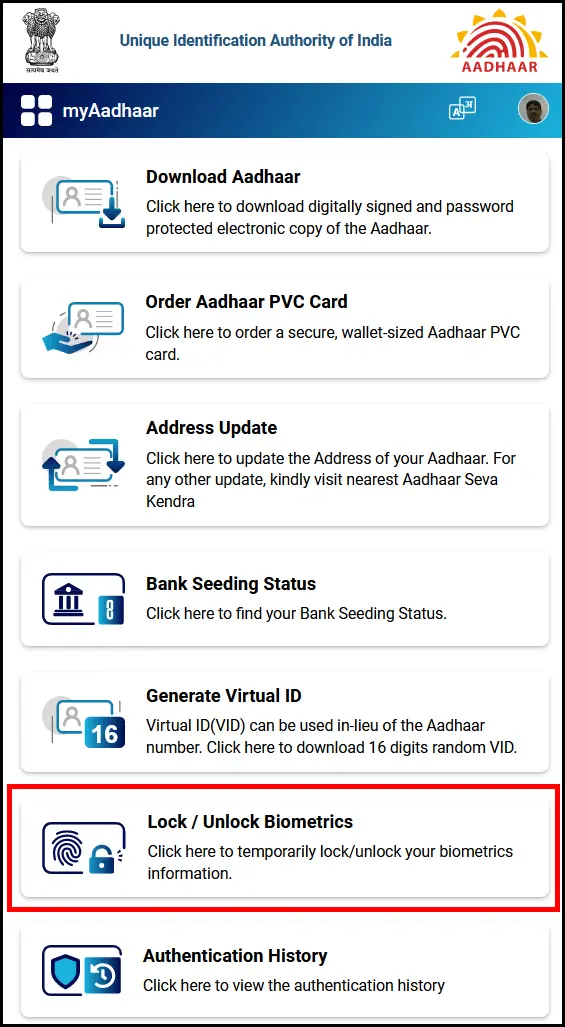
Step 5: Read the instructions and proceed – click on the Next button

Step 6: Provide your consent by clicking on the “I Understand that after locking my biometric…” paragraph, and then click on the “Next” button.
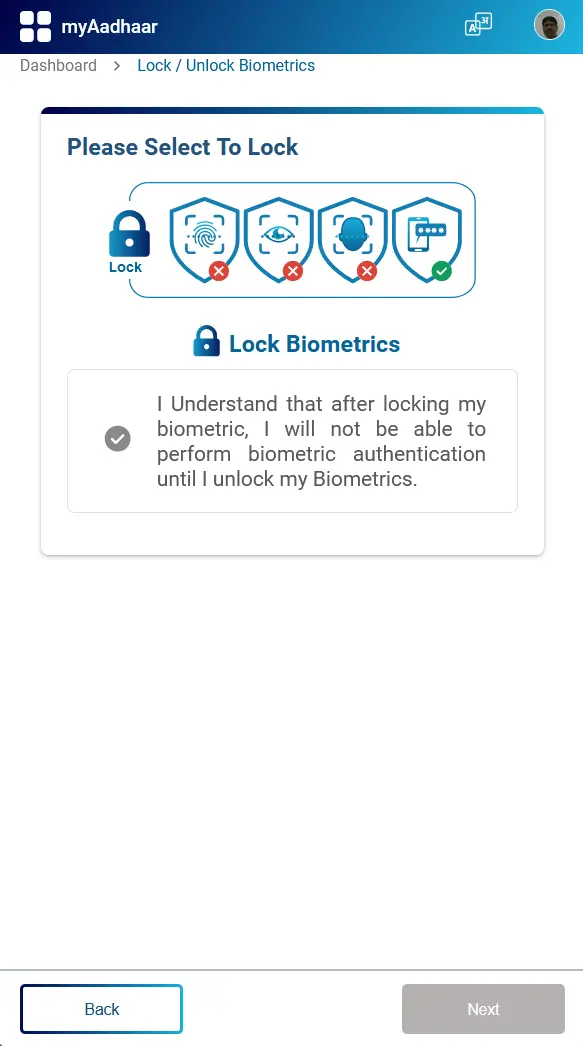
Your Aadhaar biometrics are now locked, as you can see in the following screenshot:

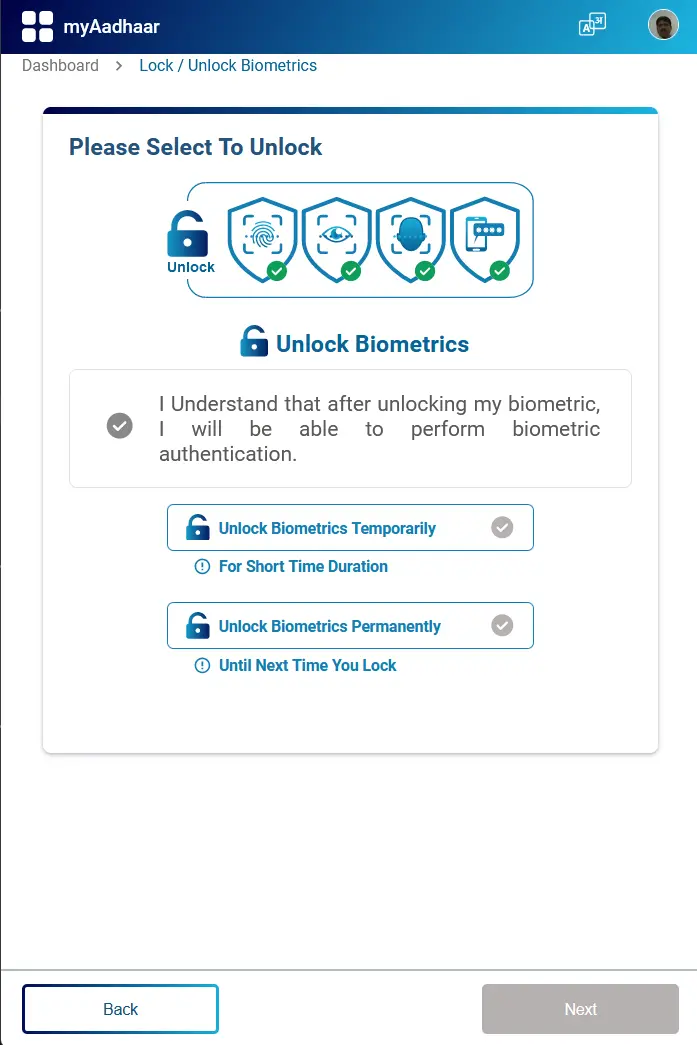
You can follow the same process to unlock your biometrics when needed. You can either unlock the biometrics temporarily, or permanently.
Using Virtual Aadhaar ID (VID)
The UIDAI allows Aadhaar holders to generate a Virtual ID which can be used for e-KYC.
The VID is a temporary, revocable 16-digit random number mapped with the Aadhaar number. VID can be used instead of an Aadhaar number whenever authentication or e-KYC services are performed. Authentication may be performed using VID like using an Aadhaar number.
The main benefit is that it is impossible to derive the person’s Aadhaar number from his VID. Also, the Aadhaar holder can revoke the old VID and generate a new VID without disrupting any of the earlier e-KYC. Generating a new VID does not cancel any of your existing KYC.
Aadhaar holders can generate a VID either by going to the UIDAI website (UIDAI), via SMS, or using the m-Aadhaar mobile app.
How to Generate Virtual Aadhaar ID
(You can also generate Virtual Aadhaar ID by visiting the myaadhaar portal)
Follow the first three steps shown in the previous section (How to Lock Your Aadhaar Biometrics).
Step 4: Select the “Generate Virtual ID” option from the selection

Step 5: Select the “Generate” or “Retrieve” radio button and then click on the “Next” button.

The system will now generate the VID and display it on the webpage. You will also get the VID via SMS.

If you have forgotten the VID, you can follow the same steps. Except this time, select the “Retrieve” option instead of the “Generate” option.
After the minimum validity period (currently set as one calendar day or after midnight), the Aadhaar number holder may request the regeneration of a new VID. This way, a new VID will be generated, and the previous VID will be deactivated.
You can also generate the VID by sending an SMS:
Type “GVID xxxx” without quotes, with xxxx = the last four digits of your Aadhaar ID, and send it to 1947.
You can also retrieve the existing VID by sending an SMS:
Type “RVID xxxx” without quotes, with xxxx = the last four digits of your Aadhaar ID, and send it to 1947.
Visit this page for more information on Aadhaar Services on SMS.
What is Aadhaar Lock/Unlock
In addition to biometric lock, UIDAI provide a more comprehensive mechanism of locking and unlocking Aadhaar number (UID).
You can lock your Aadhaar (UID) via UIDAI website or through the mAadhaar app.
If you lock your Aadhaar card using this method, you cannot perform any sort of Authentication using UID, UID Token & VID for Biometrics, Demographic & OTP modality. Once the UID (Aadhaar ID) is locked, you can only use your VID for authentication. It is recommended that you use this service carefully.
If you want to unlock UID, you can do so by using latest VID, through UIDAI website or mAadhaar app. After unlocking Aadhaar (UID), you can perform authentication using UID, UID Token & VID.
Before you proceed to lock your Aadhaar ID, you must first generate a Virtual Aadhaar ID (VID).
Check this FAQ for more information before proceeding.
How to Lock/Unlock Aadhaar ID
Step 1: Visit My Aadhaar
Step 2: Select the “Lock/Unlock Aadhaar” option from the selection
Step 3: Read the instructions carefully and then click on the “Next” button.

Step 4: As you can see in the screenshot below, you must have a VID before proceeding. Enter the required data.

After you enter the OTP and click on the “Submit” button, you will be able to perform authentication using only Virtual ID (VID) and not Aadhaar Number.
What if You Forget Your VID
You can retrieve your VID (Virtual Aadhaar ID) using the SMS service.
Send SMS to 1947 from Aadhaar Registered Mobile Number (RMN), RVID xxxx (last 4 or 8 digit of UID, e.g., RVID 1234).
Conclusion
Protecting personal information is a shared responsibility between individuals and the government. In other words, you are equally responsible for ensuring the security of your Aadhaar ID.
Here are some Best Practices to ensure the privacy and security of your Aadhaar ID:
- Keep Your AADHAAR Safe: Store your physical AADHAAR card in a secure and private location, such as a locked drawer or safe. Do not carry it in your wallet.
- Do Not Share Your AADHAAR Number Freely: Be cautious about sharing your AADHAAR number. Only share it with trusted organizations and government agencies when required by law.
- Verify the Authentication Request: Whenever someone requests authentication using your AADHAAR, verify the purpose and the entity making the request. Be cautious if something seems suspicious.
- Use Secure Authentication Methods: When authenticating with AADHAAR, choose secure methods and channels. Avoid using public Wi-Fi or unsecured websites for AADHAAR-related activities.
- Regularly Update Contact Information: Ensure your phone number and email associated with AADHAAR are up-to-date. This helps in receiving important notifications and alerts.
- Be Wary of Phishing and Scams: Be cautious of phishing attempts and scams related to AADHAAR. Do not click on suspicious links or share sensitive information through unsolicited emails or messages.
- Check Your Authentication History: Periodically review your AADHAAR authentication history on the official AADHAAR website. Look for any unauthorized or suspicious activities.
- Secure Your OTPs: If you receive One-Time Passwords (OTPs) for AADHAAR-related activities, do not share them with anyone and ensure they are not stored in an easily accessible location.
- Stay Informed: Keep yourself informed about AADHAAR-related updates, security measures, and guidelines from official government sources.
- Report Loss or Theft Immediately: If your physical AADHAAR card is lost or stolen, report it immediately to the authorities and the UIDAI (Unique Identification Authority of India). They can help you secure your AADHAAR.
Useful Links
- February 21, 2025
Essential Cybersecurity Measures for 2025
If you are reading this, you probably already know that IT teams will face even greater cybersecurity challenges in 2025 than they did in 2024. Let us explore the four… - November 20, 2024
The Evolving Role of Managed Service Providers (MSPs) in SMB
MSPs like ForNext Technologies are not just IT support providers; they are growth partners. By addressing challenges and unlocking opportunities, we help SMBs focus on what they do best—running their… - August 23, 2024
How Small Companies Can Build an Effective Cybersecurity Training Program
By developing a robust employee cybersecurity training program, small businesses can significantly reduce risk and build a culture of vigilance. - July 10, 2024
SharePoint Online vs. OneDrive: Choosing the Right Tool for Your Team
In this blog post, we will delve into the differences between OneDrive for Business and SharePoint Online, highlighting why OneDrive is great for small teams and personal use, while SharePoint… - May 17, 2024
Supercharge Your Productivity with these Free Desktop Applications
Here is an extensive list of some of the best free productivity applications for PCs that will definitely help you boost your productivity and optimize your performance. - April 3, 2024
Email Authentication with SPF, DMARC, and DKIM
The importance of email authentication mechanisms - SPF, DMARC, and DKIM, for protection against email-based threats such as spoofing. - February 23, 2024
Why Should You Protect Your VPN with MFA
In this post, we explore the reasons why you should protect your VPN with MFA to ensure trusted access to your IT resources. - February 12, 2024
FREE: Migrate Your Emails and Data to Microsoft 365
A FREE Next-Generation Firewall (NGFW) solution to safeguard your network and increase productivity, including free 1-year technical support. - February 9, 2024
Zero Trust Architecture
In this post, we explore the "Zero Trust" Architecture. We will see why this "never trust, always verify" approach has become so important in the present IT landscape. We will… - January 31, 2024
The True Benefit of Outsourcing Your IT
When you hire an outside agency to manage the IT operations of your company, what would be the most important benefit you will get from it?
- Disclaimer
Company names, products, logos, trade marks and any other proprietary intellectual property or otherwise belongs to the rightful owner, which is not us. You should not assume, even if a company name is in the website/domain name of this website, that there is an express, implied, or otherwise agreement, joint venture, partnership, or other relationship between us as website proprietors and any of these companies that are discussed merely for educational or other purposes. The opinions, estimates, expectations, and projections contained in any disseminated information are accurate as of the date of release and are subject to change without additional notice. We do our best to ensure that the presented research and/or information has been compiled, obtained, discerned, or interpolated from reliable and trustworthy sources, and therefore believe the positions and beliefs shared are accurate and complete, though obviously not all material known or obtained will be contained, as distilling information into manageable quantity is in large part a goal. We are not responsible for any errors or omissions contained in any disseminated material and are not liable for any loss incurred as a result of using the material in any way. The intent is merely to provide useful information, products, and services, some of which we may be compensated for.
LET'S GET IN TOUCH...
